Where you work
Inside Shopify
Configure the integration and review generated documents in the embedded app. Use Shopify admin actions when an order needs manual attention.
inFakt Integration connects your Shopify store with inFakt and automates document creation around the way your business works. Choose the document types, customer rules and order events that fit your process, then manage the results from Shopify.
Overview
The app brings Shopify order and buyer information into inFakt, then applies the rules you configure. It supports a mixed B2B and B2C workflow, multiple document types, payment updates and day-to-day document management.
Where you work
Configure the integration and review generated documents in the embedded app. Use Shopify admin actions when an order needs manual attention.
When it runs
Choose an order-created, unpaid-order-created, paid or completed trigger for each customer group and document type.
Where documents live
Documents are created in your connected inFakt account and remain accessible from the Shopify integration.
The complete journey
The flow stays close to the work your team already does in Shopify.
Configuration
The setup sequence is designed around merchant decisions rather than technical configuration.
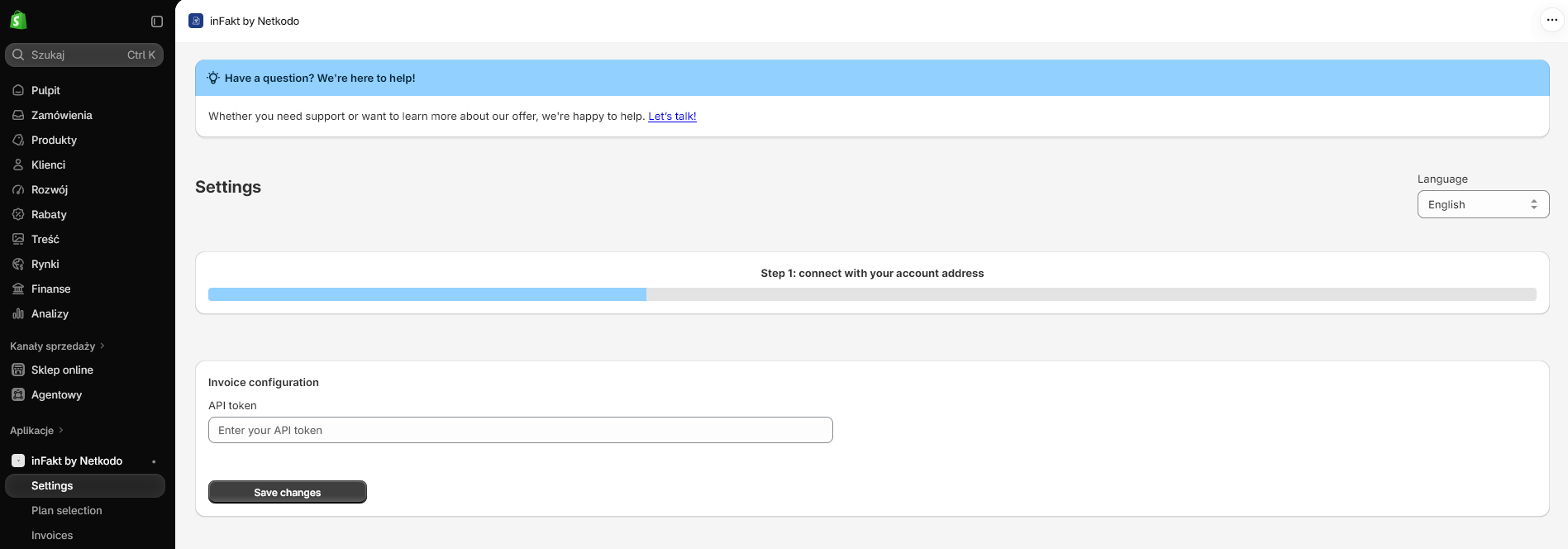
01 · CONNECT
Enter your inFakt API token in the embedded Shopify app and validate the connection.
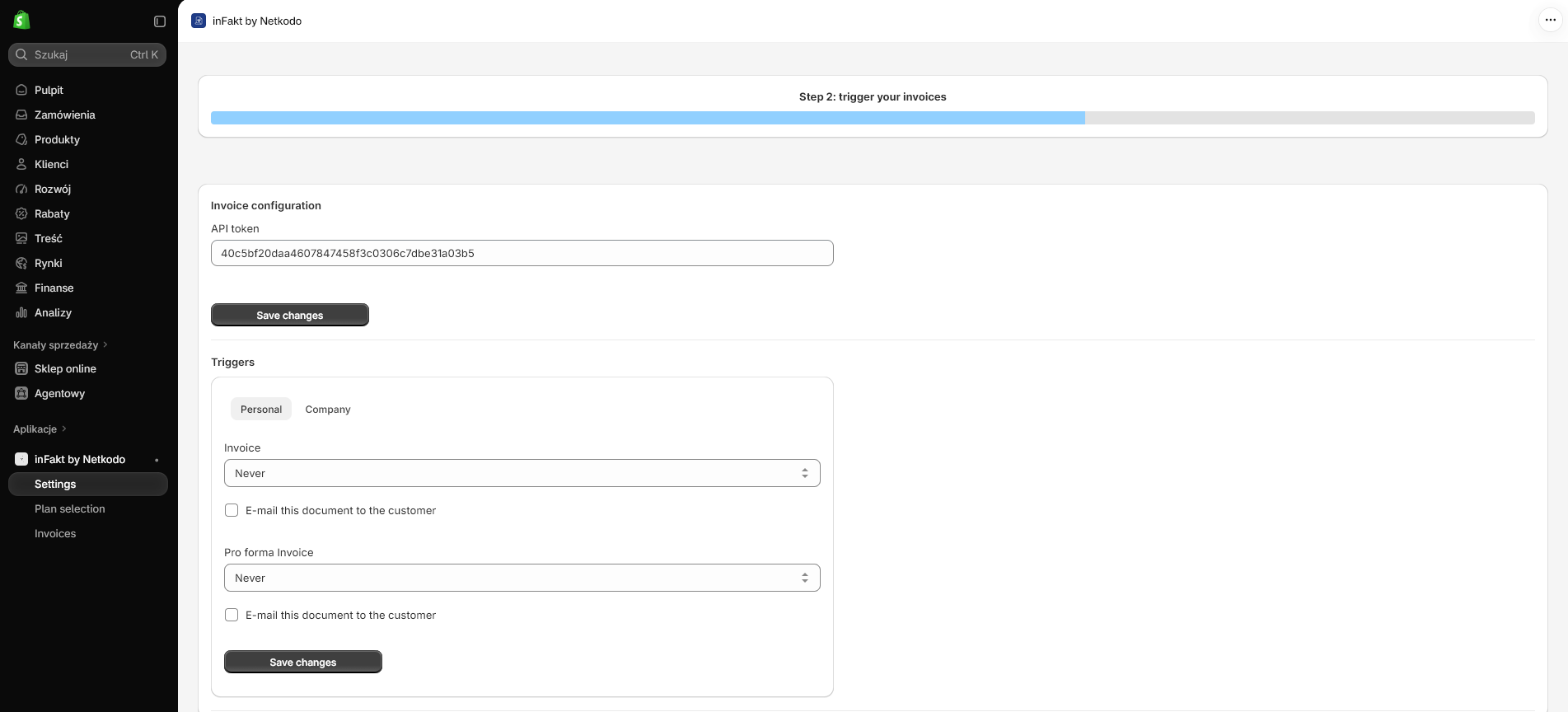
02 · SET TRIGGERS
Configure automation separately for personal and company orders, and select a trigger for each available document type.
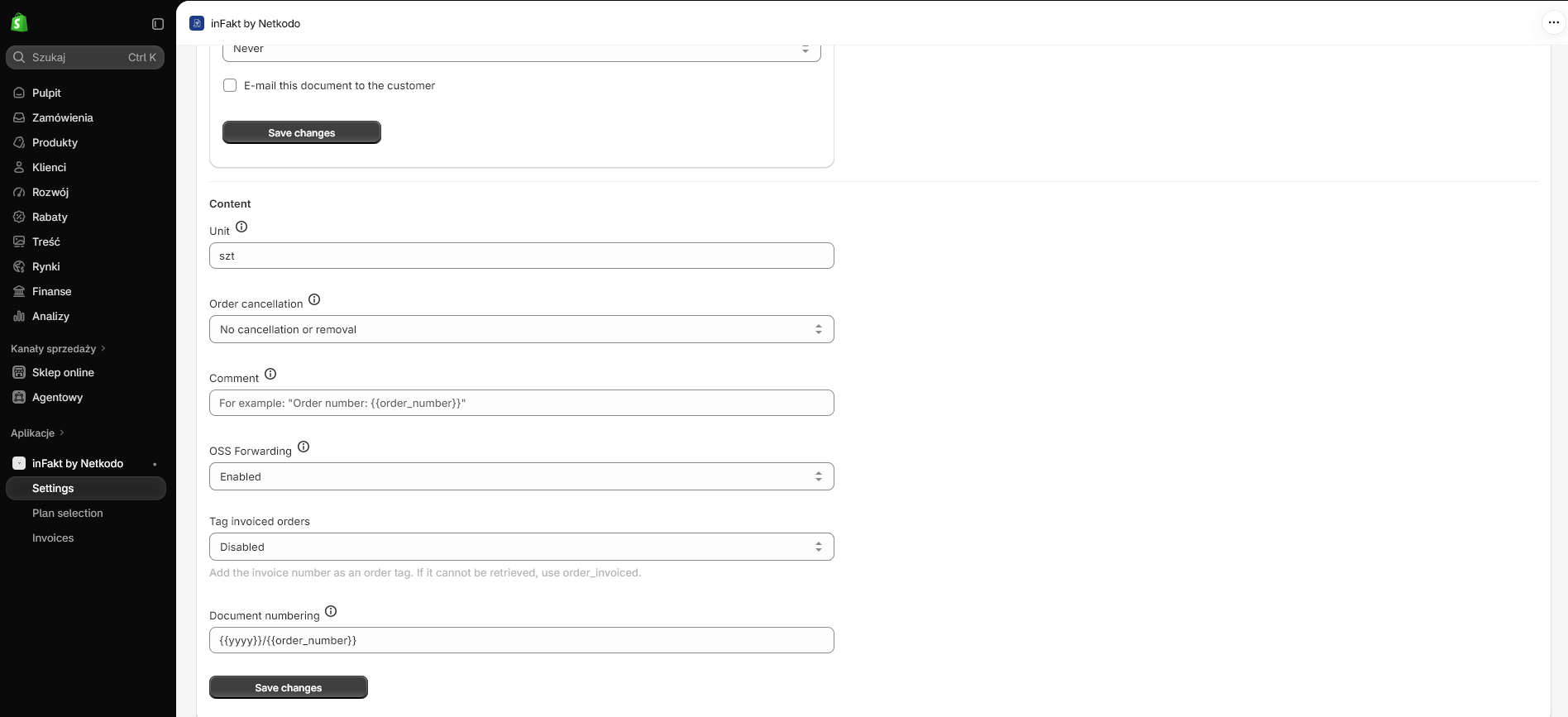
03 · SET DOCUMENT DETAILS
Configure quantity units, numbering, order comments, cancellation handling, NIP collection and optional OSS forwarding.
04 · REVIEW
Browse standard and OSS documents, check statuses, download PDFs or resend document emails from the app.
Automatic processing
Each document type can have its own trigger. The app keeps separate trigger settings for personal and company orders, so mixed sales do not need to follow a single rule.
| Trigger | When it runs | Typical fit |
|---|---|---|
| Any order created | When a Shopify order is created. | When the order itself is enough to begin the document workflow. |
| Unpaid order created | When an order is created and is unpaid. | When you want a document for the initial unpaid state. |
| Order paid | When Shopify records payment. | When payment confirmation is your accounting milestone. |
| Order completed | When the order reaches completed status. | When your workflow waits for fulfillment to finish. |
| Never | No automatic document creation for that rule. | When you want to handle that document type manually. |
Company and personal orders
The app uses buyer tax information to distinguish company orders from personal orders and applies the corresponding trigger settings.
A Checkout UI extension can capture the customer’s invoice request and tax number. NIP information may also be extracted from order data such as checkout attributes or address fields.
Set different document types and trigger timings for company and personal orders. For example, a store can use a company invoice workflow and a separate consumer workflow.
For each configured trigger, choose whether the created document should be sent to the customer automatically.
Document details
The integration prepares the document using the Shopify order and your saved preferences, reducing repeated entry across the two systems.
Configure automation for invoices, pro forma invoices, bills and receipts. Trigger settings can be managed independently for each type and customer group.
Relevant buyer details, NIP, products, quantities, shipping lines, discounts, currency and payment information are included in the document workflow.
Set a quantity unit, numbering template and order comment. Merge tags can make comments or numbering reflect order data.
Choose how the integration should handle a Shopify order cancellation when a related document has already been created.
EU order handling
If your business uses OSS for relevant EU sales, the app includes an option to forward eligible orders to the OSS flow in inFakt.
Use the document configuration to turn on OSS forwarding for the integration.
The invoice workspace separates standard documents from OSS documents so teams can find the relevant record more easily.
The order remains the operational starting point in Shopify while the document is created and managed in the connected inFakt account.
Shopify Admin actions
Automation handles routine orders. When a particular order needs attention, staff can use the Shopify admin actions and embedded invoice workspace.
Order action
Manually generate a document for a selected order when it falls outside your automatic rules or needs a one-off action.
Order action
View the available invoice link for an order from its Shopify admin context.
Embedded workspace
Browse documents, review status, download PDFs and resend customer emails from the app.
A practical workflow
01 · CONNECT
Make sure the integration can communicate with the intended inFakt account.
02 · DECIDE
Choose the document type and timing needed for company and personal orders.
03 · CONFIGURE
Review numbering, comments, units, cancellation handling, email delivery and OSS forwarding.
04 · REVIEW
Use Shopify orders and the embedded document list to handle routine work and exceptions.
FAQ
Invoices, pro forma invoices, bills and receipts. Each can have its own trigger settings for company and personal orders.
Available trigger choices include any order created, an unpaid order created, an order paid, an order completed, or never for manual handling.
Yes. The app maintains separate trigger settings for company and personal orders and uses buyer tax information to distinguish the groups.
Yes. Automatic sending can be enabled for the relevant document trigger. Staff can also resend document emails from the embedded invoice workspace.
The Checkout UI extension can collect invoice intent and NIP information. An OSS forwarding option is available for eligible EU order workflows.
Yes. Shopify admin actions support manual document generation and invoice-link lookup. The app also provides document status, PDF download and email resend controls.
Ready to streamline invoicing?
Install inFakt Integration and configure the document workflow that fits your store.
Install inFakt Integration